Your Mac, explained.
Fixed. Proven.
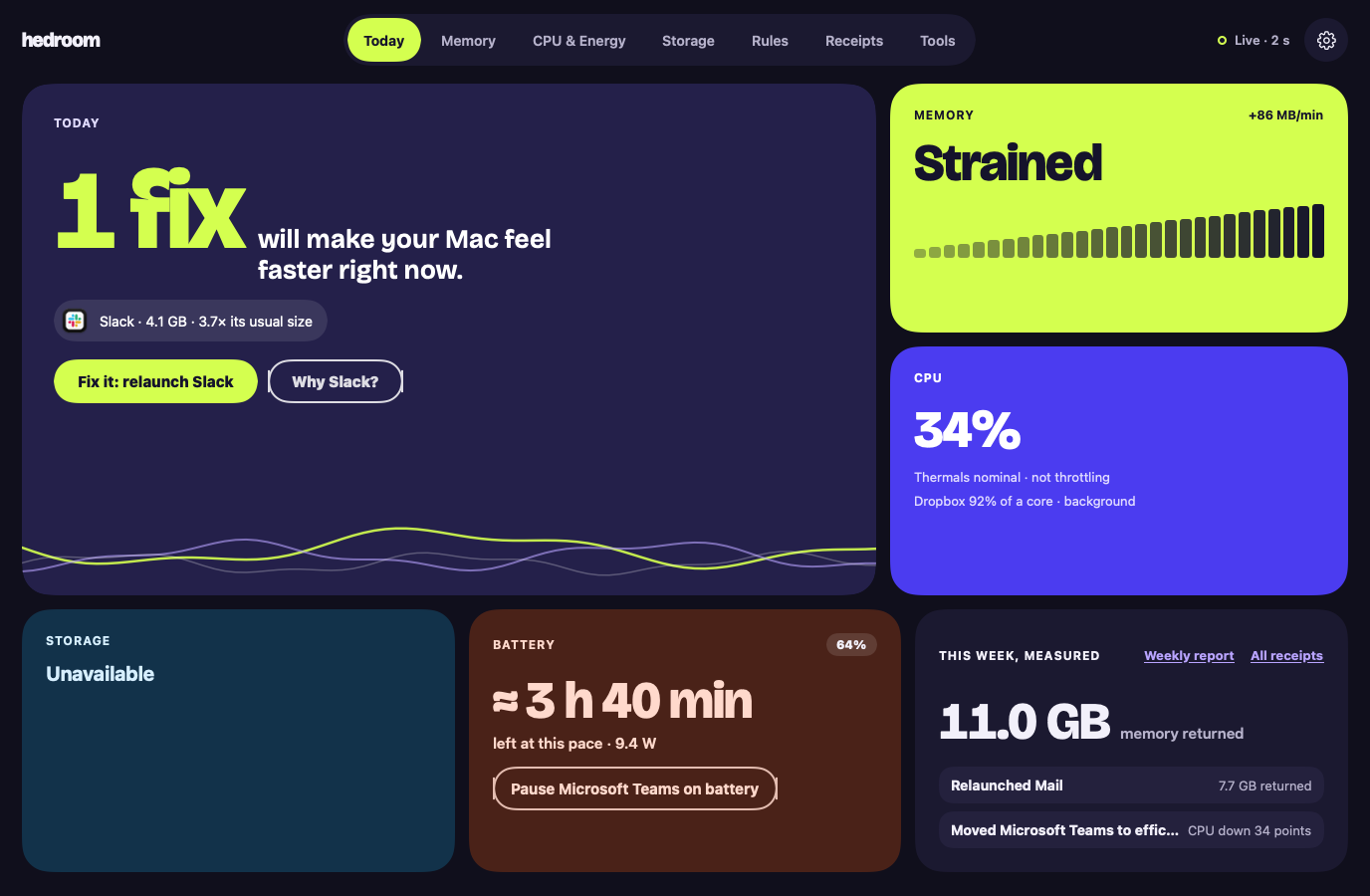
Hedroom tells you, in plain words, which app is slowing your Mac. It fixes it with your say-so, then measures whether it worked.
Hedroom in numbers
- 0.27%of one core with every window closed, measured on one M3 Pro. Method and limits
- 10operations the admin helper understands. There is no eleventh. Security
- 4outbound connections, every one listed with what it sends. Privacy
- 0analytics SDKs, accounts or scare counters. What it never does
Three things, in this order
the real cause
Not "used RAM". Hedroom reads memory pressure and swap, then names the app: an Electron app that has grown to several times its usual size, or a sync client pinning a core.
with your consent
Relaunch, pause or move an app to the efficiency cores. Each step is explained first, nothing quits silently, and you can put it back any time.
with a receipt
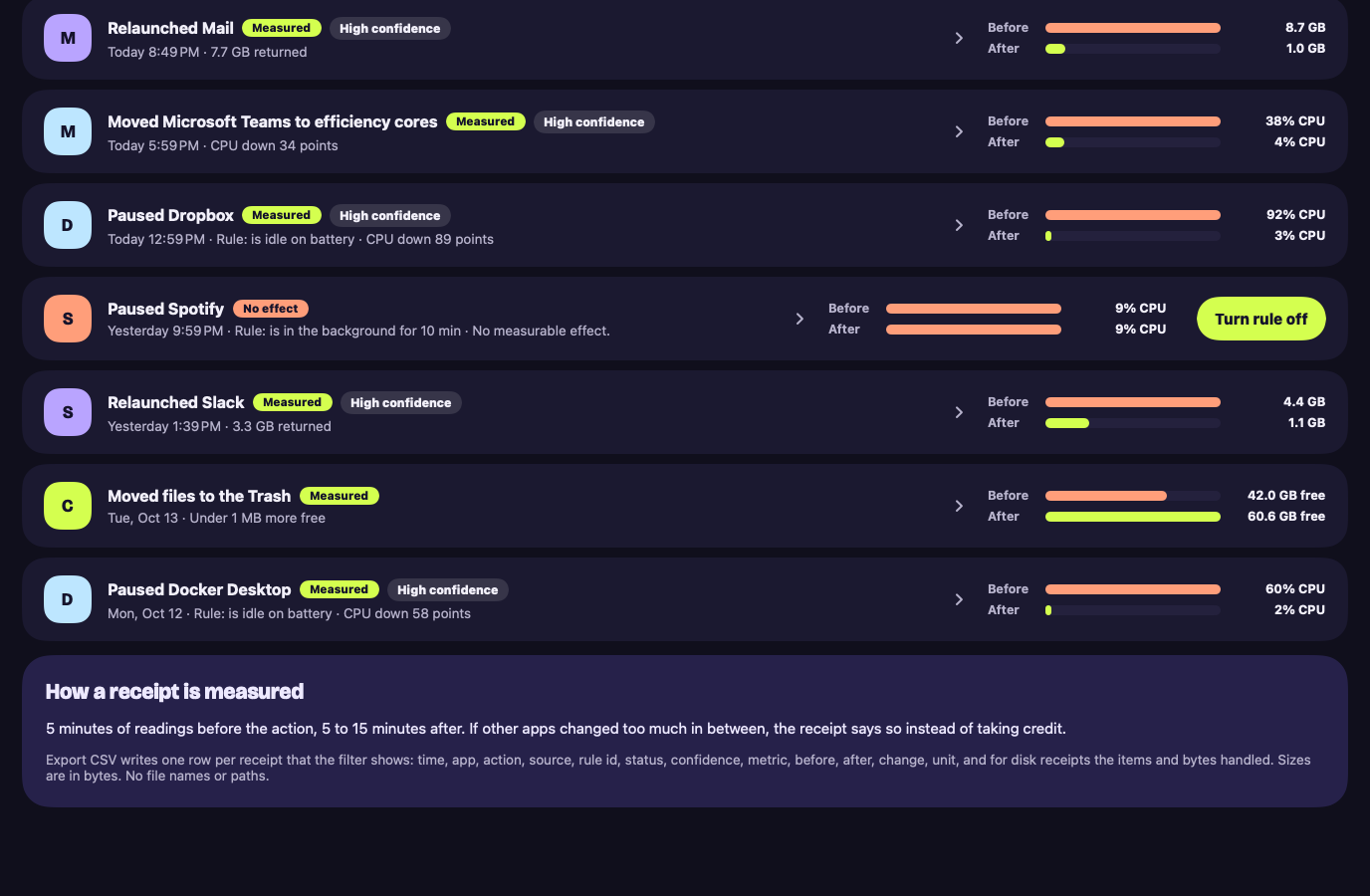
Readings before, readings after, one honest verdict. If it did nothing you can measure, the receipt says so.
Six tools for the deeper questions
Each one shows its effect before and after, like everything else in Hedroom.
Startup items
See what starts when you log in, what each item costs in memory, and which ones you seem not to use.
Free to see, Pro to change
Display advisor
Shows how hard WindowServer is working to draw your screens, and offers changes that may give some of it back.
Free to see, Pro to change
Power & fans
Battery profiles for the whole day, battery health, and fan curves on MacBook Pro.
Free to see, Pro to change
Local AI headroom
Check whether a local model will fit in your Mac's memory before you download or load it.
Free to see, Pro to change
Browser companion
A small extension that sleeps tabs you have not used, so your Mac has more memory.
Free
Process library
Plain words for the names you see in Activity Monitor, refreshed about once a week from a signed list.
Free
Also in Hedroom: energy per app, a weekly report, rules, and storage cleanup to the Trash. See every feature.
No Free RAM button. On purpose.
Memory that macOS uses for cached files is working for you. Emptying it makes your apps reread from disk. Hedroom will not do that, and it will not scare you with a count of "problems". It shows the specific thing, or it shows nothing.
How receipts work
Every action Hedroom takes gets measured, including when the answer is "it didn't help".
Before
About 5 minutes of readings before the action: the app's memory, swap rate, memory pressure, CPU.
Act
You approve one step, such as "Ask Slack to quit, then open it again". Hedroom never force quits without asking twice.
After
5 to 15 minutes of readings after. Then a verdict.
Measured
The numbers moved, and Hedroom shows both sets side by side.
No measurable effect.
The honest result when nothing changed enough to tell.
Not measurable
If other apps moved a lot in the same window, the receipt says so instead of taking credit.
What Hedroom never does
- Pause or slow macOS's own processes. Anything signed by Apple is explain-only, apart from Apple apps like Xcode that you choose to quit or relaunch.
- Quit or pause an app without asking, or an app you are using, on a call or playing audio.
- Send app names, file paths, tab titles or your usage off your Mac. It has no analytics.
- Show a scare counter or an unmeasured percentage.
- Delete your files without your permission each time. Cleanups go to the Trash, and startup items are turned off, never deleted.
- Leave a change in place that you did not confirm. A display change reverts after 15 seconds, and fans go back to automatic when Hedroom quits.
Don't take our word for it
We are writing up how we test RAM cleaners against doing nothing, method first and results after, so you can repeat it on your own Mac. The benchmark page shows the method now and the results when they are ready. In the meantime, the guide shows a test you can run in Activity Monitor in ten minutes.
Built to be checked
A utility that can pause apps and move files has to earn trust with things you can inspect, not with promises.
Trust center
Where data goes, how it is signed, what it can touch and how it is tested, on one page.
How it works
What is read, how often, how it decides, and what makes it cheap to run.
Public roadmap
What is built, what comes before launch, and what is not planned.
Fair comparisons
Against Activity Monitor and against RAM cleaners, including where Hedroom is not better.
Understand the problem before you buy anything
Each guide gives the honest answer, a way to check it yourself in Activity Monitor, and only then how Hedroom does it.
Why your Mac says memory is full (and why that's fine)
A Mac that uses nearly all its memory is doing its job. Here is how to tell normal from trouble, and what to check first.
Memory pressure vs used RAM
Why the colored graph in Activity Monitor tells you more than the 'Memory Used' number, and how to read it.
What swap is and when it hurts
Swap is macOS borrowing disk space to hold memory. A little is normal. Here is how to tell when it is costing you speed.
Free to watch. Pro to fix.
Monitoring, explanations, alerts and the storage scan are free forever. Pro is a subscription for fixes, rules, receipts and cleanup: from $31.95 a year, or $7.95 a month (planned prices). Checkout is not open yet: it opens when the first signed build is published, because the 7-day trial starts the moment you pay. Refunds within 30 days of a payment.
Questions
Why does Hedroom have no Free RAM button?
Because a button like that does not help. It makes macOS throw away cached files, and your apps then reread them from disk. Your Mac gets slower for a while, not faster. Hedroom looks at memory pressure and swap instead, finds the specific app that is the cause, and asks before it does anything. Our guide Why RAM cleaners make Macs slower has the details and a way to test it yourself.
Does it need my password?
Not to set up or to use almost everything. Hedroom runs as a normal app. Only fan curves and raising the GPU memory limit need a small helper, which requires approval in System Settings › General › Login Items. Hedroom asks only when you turn one of those on.
Does it work on Intel Macs?
No. Hedroom is for Apple Silicon Macs (M1 and later) running macOS 15 Sequoia or later. Its measurements and fixes are built around how Apple Silicon handles memory and cores.
Is my data sent anywhere?
App names, usage, history and receipts stay on your Mac. Hedroom only goes online to check your license once you have one, to look for updates, to download the signed process library about once a week (it sends nothing), and to send feedback when you press Send. The helper and the browser extension add no network calls. It has no analytics or tracking. The full list is on the privacy page.
Hear first when Pro opens
The free features need no card and no account. Pro's 7-day trial will need a card, and you will be able to cancel before it ends. If it can't show you a measurable difference, don't keep it.